




Schema Markup Strategy for B2B Service Pages
Table of content
Most B2B service pages have no structured data at all. According to Google Search Central’s structured data documentation, schema markup is the clearest signal you can send to Google about what a page is, who it serves, and what it offers. Without it, Google infers page purpose from content alone, which works, but leaves significant SERP real estate on the table.
For B2B companies, schema markup is not optional in 2026. AI Overviews pull structured data to generate answers. FAQ rich results give your service pages visual prominence without requiring a higher rank. The B2B buyer journey is research-heavy, and schema markup determines how much of that journey you capture at the top of the funnel.
This guide covers exactly which schema types B2B service pages need, how to write the JSON-LD for each, the validation workflow, and the most common implementation mistakes. If you are building on top of a B2B technical SEO playbook, structured data should be one of the first items addressed at the page level.
Why Schema Markup Is a Strategic B2B SEO Priority in 2026
The case for schema markup has shifted from “nice to have” to “table stakes” for three reasons that are specific to 2026.
First: AI Overviews are drawing traffic away from traditional blue-link results. Google’s AI Overviews use structured data as a primary input when generating service-category answers. A B2B firm with Service and FAQPage schema on its SEO services page has a structurally better chance of appearing in AI Overviews for queries like “what does an SEO agency do for B2B companies” than a competitor whose page contains the same information in unstructured paragraphs.
Second: FAQ rich results directly increase CTR without requiring rank improvement. A B2B service page at position 4 with FAQ rich results occupies more vertical SERP space than a competitor at position 3 without them. Click-through rate data from MarTech’s enterprise schema markup analysis shows pages with rich results consistently achieve 20-30% higher CTR than equivalent pages without schema, at the same rank position.
Third: Schema markup is the machine-readable layer that AI crawlers use to categorize your service pages. Chatbots and LLM-based search tools (Perplexity, ChatGPT with web search, Gemini) all use structured data when available to understand entity relationships. An Organization schema with verified sameAs links to LinkedIn, Clutch, or G2 pages signals brand authority to both Google and AI systems simultaneously.
The investment is low: a properly written JSON-LD block takes under two hours per service page to implement correctly. The compounding return on organic visibility makes it one of the highest-ROI technical SEO tasks for B2B teams.
The Business Case by the Numbers
- Pages with FAQ rich results see 20-30% higher click-through rates at the same rank position (MarTech enterprise schema analysis)
- According to Atak Interactive’s B2B schema guide, approximately 73% of first-page Google results use some form of structured data
- Google AI Overviews have appeared in over 40% of B2B informational queries as of early 2026, making schema the most direct path to AI-generated answer inclusion
- Breadcrumb rich results reduce bounce rate by showing users the site context before they click, improving the quality of organic traffic
Which Schema Types Do B2B Service Pages Need?
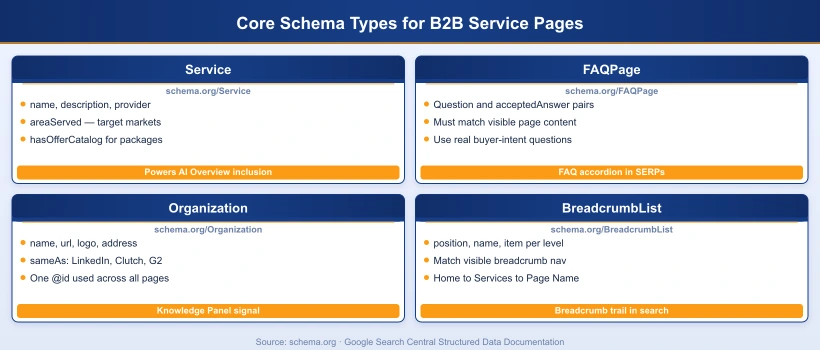
Not every schema type on schema.org is relevant to a B2B service page. Start with the four types that have the highest impact and are fully supported by Google for rich results.
| Schema Type | Purpose | Rich Result Benefit | Required Fields |
|---|---|---|---|
| Service | Defines the service offering, provider, area served, and description | AI Overview inclusion, entity understanding | name, description, provider, areaServed |
| Organization | Establishes brand identity, logo, address, and social proof | Knowledge Panel signals, entity authority | name, url, logo, sameAs |
| FAQPage | Marks up visible Q&A content on the page | FAQ accordion in SERPs, AI Overview Q&A inclusion | mainEntity array of Question/Answer pairs |
| BreadcrumbList | Shows page hierarchy in site architecture | Breadcrumb trail in SERP snippet, reduced bounce | itemListElement with position, name, item |
| Offer (optional) | Pricing information nested inside Service | Price display in structured snippets | price, priceCurrency, priceSpecification |
| Person (optional) | Named author or team member associated with the service | E-E-A-T authority signal for author pages | name, jobTitle, url, sameAs |
Implement Service, Organization, FAQPage, and BreadcrumbList as your baseline on every B2B service page. Layer in Offer and Person as your content warrants them.
Service Schema JSON-LD for B2B: A Complete Example
The Service type at schema.org/Service is the correct schema for intangible professional offerings: SEO services, consulting, software implementation, SaaS, and managed services. Do not use Product schema for these. Product schema is designed for physical goods and requires fields (SKU, GTIN, AggregateRating) that do not apply to services and will generate structured data errors in Google Search Console.
Below is a complete Service JSON-LD example for a B2B SEO agency service page. Every field is annotated:
{
  "@context": "https://schema.org",
  "@type": "Service",
  "@id": "https://yoursite.com/services/b2b-seo/#service",
  "name": "B2B SEO Services",
  "description": "Technical SEO, content strategy, and link building for B2B companies targeting enterprise buyers in the US, UK, and Europe.",
  "url": "https://yoursite.com/services/b2b-seo/",
  "provider": {
    "@type": "Organization",
    "@id": "https://yoursite.com/#organization",
    "name": "Your Agency Name",
    "url": "https://yoursite.com"
  },
  "areaServed": [
    { "@type": "Country", "name": "United States" },
    { "@type": "Country", "name": "United Kingdom" },
    { "@type": "Country", "name": "United Arab Emirates" }
  ],
  "serviceType": "Search Engine Optimization",
  "category": "B2B Digital Marketing",
  "hasOfferCatalog": {
    "@type": "OfferCatalog",
    "name": "B2B SEO Service Packages",
    "itemListElement": [
      { "@type": "Offer", "itemOffered": { "@type": "Service", "name": "Technical SEO Audit" } },
      { "@type": "Offer", "itemOffered": { "@type": "Service", "name": "Content SEO Strategy" } },
      { "@type": "Offer", "itemOffered": { "@type": "Service", "name": "Link Building for B2B" } }
    ]
  }
}
Key implementation notes:
- @id: Use a consistent URI anchor (e.g.,
/services/b2b-seo/#service) so other schemas can reference this entity - provider: Link to the Organization @id so Google connects your service to your brand entity
- areaServed: Always specify for B2B services targeting international buyers; this helps AI systems generate geographically accurate answers
- hasOfferCatalog: Use this if you offer distinct service packages; it adds depth without requiring individual Offer schemas with pricing
- serviceType: A plain-text label that AI systems use to categorize your offering in natural language answers
When you have specific pricing, nest an Offer inside the Service block:
"offers": {
  "@type": "Offer",
  "price": "2500",
  "priceCurrency": "USD",
  "priceSpecification": {
    "@type": "UnitPriceSpecification",
    "price": "2500",
    "priceCurrency": "USD",
    "unitText": "per month"
  }
}
Organization Schema: Connecting Your Brand Identity Across Pages
Organization schema does something that Service schema cannot: it creates a persistent entity anchor that every other schema on your site can reference via @id. When your Article, Service, and FAQPage schemas all point to the same Organization @id, Google builds a connected entity graph for your brand, which feeds directly into Knowledge Panel accuracy and AI Overview source attribution.
Use the same @id string sitewide: https://yoursite.com/#organization. Never change this after implementation, or all referencing schemas will lose their entity connections.
{
  "@context": "https://schema.org",
  "@type": "Organization",
  "@id": "https://yoursite.com/#organization",
  "name": "Your Agency Name",
  "url": "https://yoursite.com",
  "description": "B2B digital marketing agency specializing in SEO, demand generation, and content strategy for technology companies.",
  "logo": {
    "@type": "ImageObject",
    "url": "https://yoursite.com/wp-content/uploads/logo.png",
    "width": 300,
    "height": 80
  },
  "address": {
    "@type": "PostalAddress",
    "addressLocality": "New York",
    "addressCountry": "US"
  },
  "contactPoint": {
    "@type": "ContactPoint",
    "contactType": "customer support",
    "email": "hello@yoursite.com"
  },
  "sameAs": [
    "https://www.linkedin.com/company/your-agency",
    "https://twitter.com/youragency",
    "https://clutch.co/profile/your-agency"
  ]
}
The sameAs array is critical for B2B entities. Link to your LinkedIn company page, Clutch.co profile, G2 listing, and any industry directory where your firm has a verified presence. Each of these connections strengthens your brand entity in Google’s knowledge graph and is a direct signal that AI systems use to evaluate source authority when deciding which organizations to cite in AI Overviews.
Common Organization Schema Mistakes
- Using different @id values across pages (breaks entity linking)
- Pointing sameAs to unverified profiles or profiles without your exact brand name
- Omitting the logo imageObject (required for Knowledge Panel logo display)
- Using a generic description that does not include service category keywords
FAQPage Schema: How B2B Service Pages Win Rich Results
FAQPage schema is the highest-ROI structured data type for B2B service pages because it is the most direct path to two high-value SERP features: FAQ accordion rich results and AI Overview Q&A inclusion. According to Google Search Central’s FAQPage documentation, questions and answers must match content that is visible on the page for rich results to be granted.
{
  "@context": "https://schema.org",
  "@type": "FAQPage",
  "mainEntity": [
    {
      "@type": "Question",
      "name": "What schema markup should B2B service pages use?",
      "acceptedAnswer": {
        "@type": "Answer",
        "text": "B2B service pages should use Service, Organization, FAQPage, and BreadcrumbList schemas as a baseline. Service defines the offering, Organization establishes brand identity, FAQPage enables rich results, and BreadcrumbList shows site hierarchy in SERPs."
      }
    },
    {
      "@type": "Question",
      "name": "Does schema markup help B2B pages appear in AI Overviews?",
      "acceptedAnswer": {
        "@type": "Answer",
        "text": "Yes. FAQPage and Service schemas are the most direct signals for AI Overview inclusion. They provide Google and AI systems with machine-readable context about your content's intent and the questions it answers."
      }
    }
  ]
}
How to Pick the Right FAQ Questions for B2B Service Pages
Generic FAQ questions (“What is SEO?”) are wasted schema. The questions that generate rich results and AI citations are the ones buyers actually search for when evaluating vendors:
- Comparison questions: “What is the difference between B2B SEO and B2C SEO?”
- Process questions: “How long does B2B SEO take to show results?”
- Qualification questions: “What makes a good B2B SEO agency?”
- Pricing questions: “How much does B2B SEO cost per month?”
- Outcome questions: “What results can B2B companies expect from SEO?”
Use Google Search Console query data and the “People Also Ask” results for your target keyword to identify the exact questions your buyers are searching. These become your FAQPage schema questions and your visible on-page FAQ accordion content simultaneously.
BreadcrumbList Schema: Signaling Site Hierarchy to Google and LLMs
BreadcrumbList schema is low-effort but consistently delivers one underrated benefit: breadcrumb trail display in SERP snippets. When a B2B buyer sees yoursite.com > Services > B2B SEO in the search result, it immediately communicates site structure and page context. This reduces the uncertainty buyers feel before clicking an unfamiliar brand’s result.
{
  "@context": "https://schema.org",
  "@type": "BreadcrumbList",
  "itemListElement": [
    {
      "@type": "ListItem",
      "position": 1,
      "name": "Home",
      "item": "https://yoursite.com/"
    },
    {
      "@type": "ListItem",
      "position": 2,
      "name": "Services",
      "item": "https://yoursite.com/services/"
    },
    {
      "@type": "ListItem",
      "position": 3,
      "name": "B2B SEO Services",
      "item": "https://yoursite.com/services/b2b-seo/"
    }
  ]
}
For blog posts, the breadcrumb should reflect the content hierarchy: Home > Blog > Post Title. Make the breadcrumb schema match the visible breadcrumb navigation element on the page.
Schema Markup and AI Overviews: What B2B Teams Need to Know
AI Overviews, Perplexity answers, and ChatGPT web search results all use structured data as a quality signal when selecting source pages to cite. Understanding how this works allows B2B teams to architect their schema strategy for AI search, not just traditional Google SERPs.
The pattern AI systems use is roughly as follows:
- Crawl and index the page (requires the page to be accessible and render correctly)
- Parse structured data to understand page type, entity relationships, and content categories
- Evaluate E-E-A-T signals: author entity, organization entity, sameAs references
- Match page content and schema to the query intent
- Select pages that provide the most complete, authoritative answer
Schema markup affects steps 2 and 3 directly. A B2B service page with Service schema, Organization schema with verified sameAs links, and FAQPage schema with buyer-intent questions is structurally better positioned for AI inclusion than an identical page with no structured data.
For B2B teams also investing in optimizing for Google AI Overviews, structured data implementation is the technical foundation that makes the content-level optimization effective. Schema without strong content wins some AI citations but not all. Strong content without schema loses to pages that have both.
Priority Schema Types for AI Overview Inclusion
| AI Search Feature | Schema Type That Helps | Why It Works |
|---|---|---|
| Google AI Overview (informational) | FAQPage, Article | Direct Q&A format matches AI answer generation pattern |
| Google AI Overview (service category) | Service, Organization | Entity-level understanding of what you offer and to whom |
| Perplexity / ChatGPT citations | Article, Organization (sameAs) | Source authority evaluated via entity graph and citations |
| Knowledge Panel / Entity card | Organization (with full sameAs) | Brand entity verification across multiple properties |
How to Deploy Schema Markup at Scale Across a B2B Website
A typical B2B website has 3-15 service pages, a blog, an about page, a team page, and a contact page. Each page type needs a slightly different schema configuration. The challenge is maintaining accuracy at scale as content is updated.
Three Deployment Methods Compared
1. Hardcoded JSON-LD per page (recommended for service pages)
- Best control over schema fields and values
- No plugin dependency or auto-generation errors
- Requires developer time for implementation and updates
- Use for Service, FAQPage, and custom schemas that plugins cannot generate correctly
2. SEO Plugin auto-generation (recommended for sitewide schemas)
- AIOSEO, Yoast, or RankMath handles Organization and Article schema sitewide
- Reduces per-page implementation work for blog posts and standard pages
- Plugin-generated Service and FAQPage schemas often miss critical fields
- Supplement plugin output with manual JSON-LD for service pages
3. Google Tag Manager (for pages you cannot directly edit)
- Inject JSON-LD via a Custom HTML tag, triggered on specific page paths
- Useful for platforms where code injection is restricted (legacy CMS, third-party landing pages)
- Schema injected via GTM is visible to Googlebot as of 2024 (confirmed in Google Search Central documentation)
- Validate after deployment using the Rich Results Test URL testing mode
The @graph Pattern: All Schemas in One Block
For pages with multiple schema types, put all of them in a single <script type="application/ld+json"> block using the @graph array. This keeps the page clean and allows validators to check all schemas together:
<script type="application/ld+json">
{
  "@context": "https://schema.org",
  "@graph": [
    { "@type": "Service", ... },
    { "@type": "BreadcrumbList", ... },
    { "@type": "FAQPage", ... },
    { "@type": "Organization", "@id": "https://yoursite.com/#organization", ... }
  ]
}
</script>
Order within @graph: put the primary schema type first (Service for service pages, Article for blog posts), then supporting schemas, with Organization always last.
Common Schema Markup Mistakes B2B Service Pages Make
Schema markup errors are more common on B2B sites than on B2C because B2B teams typically lack a dedicated technical SEO specialist and rely on plugin defaults.
| Mistake | Impact | Fix |
|---|---|---|
| Using Product schema for services | Schema type mismatch, GSC errors, no rich results | Replace with Service schema; use Offer inside Service for pricing |
| FAQPage schema questions not visible on page | Rich result denied, potential manual action | Ensure every schema Q&A appears verbatim in visible page content |
| Multiple Organization schemas with different @id values | Broken entity graph, inconsistent Knowledge Panel | Use one @id sitewide: yoursite.com/#organization |
| Missing areaServed in Service schema | AI systems cannot generate geographically accurate answers | Add Country or City objects for all target markets |
| Plugin generates generic Article schema on service pages | Wrong schema type signals page as editorial, not commercial | Disable Article schema on service pages, use Service schema instead |
| Schema not updated after content changes | Schema/content mismatch, rich result suspension | Include schema review in content update workflow |
| Injecting schema via JavaScript that Googlebot does not execute | Schema not detected, no rich result eligibility | Use static JSON-LD in HTML head or validated GTM injection |
How to Validate Your Schema Markup Before and After Deploy
Validation is non-negotiable. Schema with errors is often worse than no schema, as Google may apply structured data policy penalties to pages with misleading or incorrect markup.
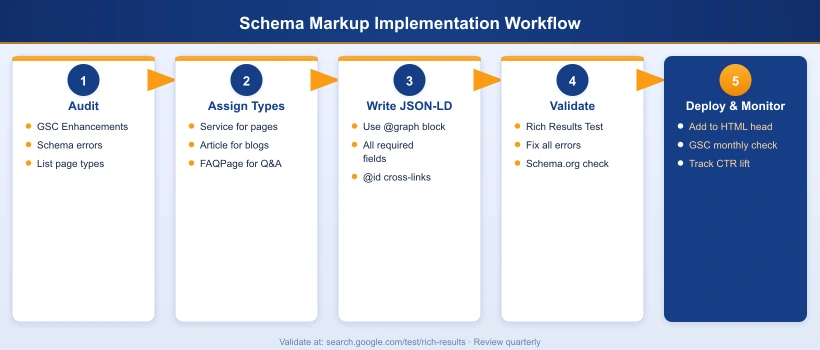
Step 1: Pre-deploy validation with Rich Results Test
Paste your JSON-LD directly into Google’s Rich Results Test (search.google.com/test/rich-results). This tool shows which rich result types your schema qualifies for and highlights any errors or warnings before the page is live. Always test in code-snippet mode before URL mode to catch errors in the JSON-LD itself.
Step 2: Full schema validation at validator.schema.org
After deployment, test the live URL at validator.schema.org. This validator checks all schema types simultaneously and shows each as a separate card in the output, which confirms that your @graph array is being parsed correctly. Each schema type (Service, Organization, FAQPage, BreadcrumbList) should appear as an individual card.
Step 3: Monitor GSC Enhancements report
In Google Search Console > Enhancements, each schema type you have deployed appears as a separate section (FAQ, Breadcrumbs, etc.). Green “Valid” status means the schema is eligible for rich results. “Warning” and “Error” statuses require immediate resolution. Check this report monthly and after any major content or schema changes.
Step 4: Track rich result appearances in GSC Performance
Filter GSC > Performance > Search type: Web > URL contains: /services/ and look for CTR improvements after schema deployment. FAQ rich results typically improve CTR within 4-6 weeks of schema validation in GSC. If CTR does not improve after 8 weeks, check that the page has real CrUX field data (low-traffic pages may not qualify for rich results).