



JavaScript SEO: What B2B SaaS Companies Get Wrong
Table of content
Most B2B SaaS websites are built on JavaScript frameworks. React, Vue, Angular, Next.js in CSR mode: these tools power the majority of SaaS marketing sites today. And for most SaaS teams, the result is a site that looks exceptional to human visitors but is effectively invisible to search engines on the first crawl.
JavaScript SEO is not about avoiding JavaScript. It is about understanding exactly where and how Googlebot struggles with JavaScript-rendered content, and designing your rendering strategy accordingly. This guide covers every major JavaScript SEO mistake B2B SaaS teams make, why each one suppresses organic traffic, and how to fix them in priority order. Mastering B2B technical SEO fundamentals starts with understanding how your rendering architecture affects every page Google tries to index.
Why JavaScript-Heavy SaaS Sites Lose Organic Traffic
A SaaS site built entirely on client-side rendering (CSR) has a fundamental crawlability problem. When Googlebot requests your page, it initially receives raw HTML. If that HTML is a near-empty shell that relies on JavaScript to populate content, Googlebot sees nothing useful on the first pass.
This is not a hypothetical future risk. Google Search Central’s official JavaScript SEO documentation explicitly confirms that JavaScript-dependent content requires a separate rendering pass, and that this rendering may be significantly delayed compared to the initial crawl. The real-world consequences for SaaS companies:
- Pricing pages not indexed: If your pricing page renders its content client-side, Googlebot may index a page with no visible pricing content, suppressing rankings for every high-intent “pricing” query your product should own
- Feature pages thin-indexed: Marketing pages describing your product’s capabilities are often the most JavaScript-heavy and the most critical for organic acquisition. If they render blank on first crawl, they compete in search results with zero content on record
- AI crawler gap: ChatGPT, Perplexity, and Claude’s web crawlers have no JavaScript rendering phase. They fetch raw HTML and index what is immediately present. A CSR SaaS site has effectively zero presence in AI-generated search answers, regardless of its content quality
- Indexing velocity penalty: A CSR SaaS blog post can take days to appear in Google’s index after publishing, while a competitor on SSG gets indexed in hours. Over months, this compounds into a significant ranking velocity disadvantage
The pattern that consistently appears in B2B SaaS SEO audits: a React-based SaaS with solid domain authority and high-quality content, yet stagnant organic traffic. The root cause is almost always JavaScript rendering architecture.
How Googlebot Actually Renders JavaScript Pages
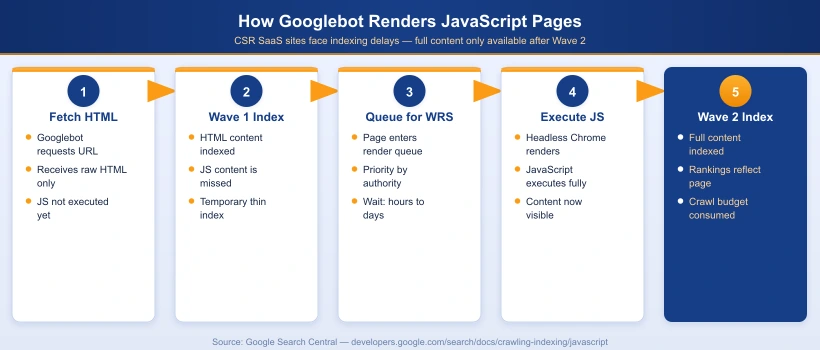
Google’s indexing pipeline for JavaScript pages works in two distinct waves:
- Wave 1 (Immediate crawl): Googlebot fetches the raw HTML of your page. It extracts any content present in the initial HTML response and queues the page for rendering. If your HTML shell is empty at this stage, the page may be temporarily indexed with no content at all
- Wave 2 (Rendering queue): Google’s Web Rendering Service (WRS) processes the JavaScript on your page, executes it in a headless Chromium environment, and indexes the fully rendered output. This is computationally expensive for Google. The delay between Wave 1 and Wave 2 ranges from hours for high-authority sites to several days for lower-authority or larger sites
The rendering queue is Google’s primary constraint. Googlebot allocates crawl budget based on your site’s authority and the historical crawl value of each page. Processing JavaScript requires significantly more compute resources than reading static HTML. For B2B SaaS sites with hundreds of marketing, pricing, and feature pages, this constraint directly limits how frequently key pages are re-crawled and re-indexed after content updates.
| Rendering Type | Googlebot Experience | Indexing Speed | Crawl Budget Impact |
|---|---|---|---|
| Static HTML | Full content on first fetch | Fastest (hours) | Lowest |
| SSR (Server-Side Rendering) | Full content in initial HTML response | Fast (hours to 1 day) | Low |
| SSG (Static Site Generation) | Full content served from CDN instantly | Fastest (hours) | Lowest |
| CSR (Client-Side Rendering) | Empty HTML shell on Wave 1 | Slow (days) | Highest (requires WRS) |
| Hybrid (SSR + CSR) | Core content in HTML, interactive elements via JS | Fast (hours to 1 day) | Low to medium |
The 7 JavaScript SEO Mistakes B2B SaaS Companies Make
Mistake 1: Building All Public Marketing Pages as Full CSR
The most common and most damaging mistake is treating the SaaS marketing site identically to the authenticated product app. Dashboards and in-app interfaces genuinely need CSR for responsiveness. Your homepage, pricing page, feature pages, and blog posts do not.
A B2B SaaS team that builds their entire marketing site in create-react-app with pure CSR and no SSR layer has made every public-facing page invisible to Googlebot’s first crawl. The SEO cost compounds over time as competitors on SSG or SSR platforms accumulate faster indexing velocity, cleaner crawl signals, and compounding ranking history.
Mistake 2: Rendering Meta Tags, Titles, and Canonical URLs via JavaScript
Meta tags injected by JavaScript frameworks including react-helmet and next/head in CSR mode are not available to Googlebot on the first crawl. The result: your pages are temporarily indexed with no title tag, no meta description, and no canonical URL, all of which directly affects ranking relevance and click-through rate.
Search Engine Journal’s analysis of Google’s updated JavaScript SEO documentation confirms that canonical tags injected via JavaScript may be ignored or processed inconsistently during the first indexing wave. If your canonical is missing from the initial HTML response, duplicate content risks and self-cannibalization increase substantially across your site.
Mistake 3: JavaScript-Only Internal Links
SaaS apps frequently use JavaScript-based routing (React Router, Vue Router, Angular Router) that generates navigation without proper HTML anchor tags. When navigation links use onClick handlers or are built entirely in JavaScript without an underlying <a href="..."> element, Googlebot cannot discover or follow them.
Googlebot does not execute onClick events. It follows <a href> links. An SPA with JavaScript-only navigation creates an orphaned internal link structure from Google’s perspective, regardless of how sophisticated the user-facing navigation appears. Key pages may receive zero crawl equity from internal links even when prominently placed in the navigation.
Mistake 4: Lazy Loading via Scroll Events
Scroll-event-based lazy loading is invisible to Googlebot. Googlebot does not scroll during rendering. It renders the initial viewport state and stops. Any content that loads in response to a scroll event is never triggered and never indexed.
The correct implementation uses the Intersection Observer API or the native loading="lazy" attribute on images. These work based on element visibility in the initial render geometry, not scroll position, and are fully compatible with Googlebot’s rendering model. The native loading="lazy" attribute is supported in all modern browsers and is the safest SEO-compatible lazy loading approach for images.
Mistake 5: No Structured Data or Schema Markup
Many B2B SaaS marketing sites have no JSON-LD structured data at all. This is a compounding problem for JavaScript-heavy sites: even when Googlebot does fully render the page, there is no structured signal to help it classify the content type, author, publishing date, or FAQ eligibility for rich results and AI Overview citations.
The minimum structured data set for SaaS marketing sites: Organization sitewide, Article on all blog content, FAQPage on any page with a visible FAQ section, and BreadcrumbList on all inner pages. All structured data must be placed in the server-rendered HTML, not injected by JavaScript after page load, to ensure reliable processing during Wave 1.
Mistake 6: JavaScript Bundle Bloat Draining Crawl Budget
Every JavaScript file that Googlebot must download and execute during rendering consumes crawl budget. Sitebulb’s advanced rendering guide documents that JavaScript execution is significantly more compute-intensive for Googlebot than raw HTML parsing. SaaS marketing sites with 2 to 5MB unoptimized JavaScript bundles are wasting crawl budget on code that could be split, deferred, or eliminated entirely.
Route-based code splitting, deferred loading of third-party analytics scripts, and removing unused dependencies are not just performance wins. They directly improve how efficiently Google can crawl and render your site’s content at scale, particularly for sites with hundreds of indexed pages.
Mistake 7: Partial SSR (Body Renders, Head Does Not)
A particularly damaging hybrid failure pattern: a SaaS site where the body content renders server-side correctly, but the document <head> is still populated client-side by a JavaScript head management library. Googlebot receives the page body in Wave 1 but has no title, no canonical, and no meta description until Wave 2 rendering completes.
This occurs when teams add SSR to a legacy CSR application using a framework wrapper but fail to migrate their head management library to server-rendering mode. A complete SSR implementation must render both the body content and the full document <head> in the initial HTML response. Verify this with a simple curl -s https://yoursite.com/pricing | grep -i "<title>": if the output is empty, your head is still JavaScript-rendered.
CSR vs SSR vs SSG: Choosing the Right Rendering Strategy for SaaS
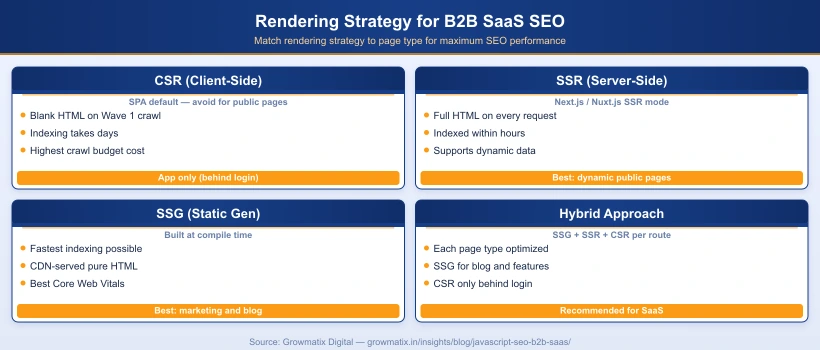
The practical answer for most B2B SaaS marketing sites is a hybrid approach. Different page types have different requirements, and the rendering strategy should match each page’s indexability needs:
| Page Type | Recommended Rendering | Rationale |
|---|---|---|
| Homepage | SSG or SSR | Highest crawl priority; must be fully readable on first fetch |
| Feature and product pages | SSG | Content changes infrequently; static HTML is fastest to index |
| Pricing page | SSR or SSG with ISR | Must update when pricing changes; SSR or incremental static regeneration ensures accuracy |
| Blog posts and content hub | SSG | Static content; best indexing speed and Core Web Vitals scores |
| Campaign landing pages | SSG | Performance-critical; minimal dynamic content needed |
| Product documentation | SSG | High crawl value; static generation optimizes both SEO and load speed |
| App dashboard (authenticated) | CSR | Behind login wall; Google cannot and should not index these pages |
Next.js and Nuxt.js are the dominant frameworks for this hybrid pattern in the SaaS space. Both support per-page rendering strategy configuration, enabling individual routes to use SSG, SSR, or CSR independently without a full infrastructure rewrite.
For teams on a React SPA that cannot be immediately migrated, dynamic rendering is a practical interim solution: detect Googlebot’s user-agent and serve a pre-rendered HTML snapshot to crawlers, while continuing to serve the React SPA to regular users. This resolves most crawlability issues quickly while a longer-term migration is planned.
How to Audit Your SaaS Website for JavaScript SEO Issues
Running a proper JavaScript SEO audit requires checking what Googlebot actually receives versus what a human browser sees. These are frequently very different on JavaScript-heavy SaaS sites. A thorough B2B technical SEO audit should include all of the following JavaScript-specific checks.
Step 1: Disable JavaScript in Chrome to Simulate Googlebot Wave 1
Open any page you want to audit in Chrome. Navigate to Chrome DevTools (F12) > three-dot menu > More Tools > Rendering, then check “Disable JavaScript” and reload the page. What you see is a close approximation of what Googlebot receives in Wave 1. If your key content including headline, body text, and navigation is missing, you have a critical CSR indexing problem.
Step 2: Use Google Search Console URL Inspection
For any already-indexed page, go to Google Search Console > URL Inspection > enter the URL. Click “View crawled page” and compare two views:
- The HTML tab shows the raw HTML Googlebot received on the first crawl
- The Screenshot tab shows the fully rendered view after Wave 2 processing
- Any content visible in the screenshot but absent from the HTML tab is JavaScript-rendered and at risk of indexing failure or delay
Step 3: Run a Dual-Mode Crawl in Screaming Frog
Screaming Frog SEO Spider allows you to crawl your site both with and without JavaScript rendering enabled. Run two separate crawls and compare: title tags, meta descriptions, word count per page, and internal link counts. Pages with significantly lower word counts in the non-JavaScript crawl mode are CSR-dependent and are prime candidates for migration to SSR or SSG.
Step 4: Audit for JavaScript-Only Internal Links
In Screaming Frog’s non-JavaScript crawl results, check the Inlinks report for critical pages like your homepage, pricing page, and feature pages. If these pages show zero or very few inlinks in non-JavaScript mode but many inlinks in JavaScript mode, your internal navigation structure is invisible to Googlebot’s link discovery and crawl equity distribution.
Step 5: Validate Structured Data in Rendered State
Use Google’s Rich Results Test > Fetch via Google for any page with schema markup. This shows structured data as Google sees it after full rendering. Cross-reference against validator.schema.org to confirm all schema types and required fields are valid, complete, and accessible in Wave 1.
Fixing JavaScript SEO: A Priority-Ordered Action Plan
The sequence of fixes matters. Address the highest-impact changes that resolve the most critical indexing barriers first.
Priority 1: Migrate Public Pages to SSR or SSG
This is the highest-impact fix for most SaaS teams. If you are on Next.js, converting page components from CSR to SSG often requires replacing useEffect data fetching with getStaticProps. For Nuxt.js, set ssr: true in your nuxt.config.js and audit each page component for client-only data fetching patterns that need to move server-side.
If a full framework migration is not immediately feasible, implement dynamic rendering as an interim measure. Prerender.io, Rendertron, and similar services detect Googlebot’s user-agent and return a pre-rendered HTML snapshot. This resolves Wave 1 content visibility within days while the proper migration is planned.
Priority 2: Move All Meta Tags to the Server-Rendered HTML Head
Every page’s title tag, meta description, canonical URL, and Open Graph tags must be present in the initial HTML response, not injected post-load by JavaScript. In Next.js, use the built-in <Head> component from next/head within a getServerSideProps or getStaticProps page to ensure server-side population. Verify the fix immediately: fetch any page URL with curl -s https://yoursite.com/pricing and confirm the output includes your expected title and meta description tags.
Priority 3: Replace JavaScript Navigation with Semantic Anchor Tags
Audit all navigation elements including top nav, footer nav, sidebar nav, breadcrumbs, and internal CTA links. Confirm each uses a proper <a href="..."> tag with a real URL. React Router’s <Link> component renders as a proper anchor in SSR mode. onClick handlers or programmatic navigation calls like router.push() without a corresponding href must be updated to include explicit href attributes for Googlebot link discovery.
Priority 4: Fix Lazy Loading Implementation
Replace all scroll-event-based lazy loading with SEO-compatible alternatives:
- For images: add
loading="lazy"to all<img>tags below the fold. This is supported natively in all modern browsers and is fully transparent to Googlebot - For below-fold content sections: replace scroll-triggered visibility logic with Intersection Observer callbacks so content becomes visible as soon as the element enters the render viewport geometry
Priority 5: Add JSON-LD Structured Data in Server-Rendered HTML
Implement a <script type="application/ld+json"> block in the server-rendered HTML for all public pages. Use a single block with an @graph array containing all applicable schema types: Article, FAQPage, BreadcrumbList, and Organization. Ensure this block appears in the initial HTML response, not injected post-render, to guarantee reliable processing during Wave 1.
JavaScript SEO Tools Every B2B SaaS Team Should Use
| Tool | What It Diagnoses | Best For |
|---|---|---|
| Google Search Console | URL Inspection: crawled HTML vs rendered screenshot comparison; Coverage report for indexing gaps | Confirming what Google actually sees on any specific URL |
| Screaming Frog SEO Spider | Dual-mode JS/non-JS crawl; internal link discovery comparison across rendering modes | Site-wide CSR content gap analysis and orphaned page detection |
| Chrome DevTools | Disable JavaScript to simulate Wave 1 crawl; Lighthouse for Core Web Vitals and bundle size analysis | Page-level rendering diagnosis and performance auditing |
| Google Rich Results Test | Validates schema markup in the fully rendered page as Google sees it post-WRS | Confirming structured data is present and valid after rendering |
| Ahrefs Site Audit | Renders pages with JavaScript enabled; identifies orphan pages, crawl errors, missing meta data | Ongoing monitoring and regression detection after JS SEO fixes |
| Sitebulb | JavaScript rendering audit reports; internal PageRank distribution visualization | Deep rendering analysis and internal link equity mapping |
Of these, Google Search Console’s URL Inspection tool is the single most authoritative source for understanding what Google sees on any specific URL. All other tools produce useful approximations, but only GSC shows you Google’s actual crawled HTML and rendered screenshots for each page.