



How to Run a B2B Technical SEO Audit in 2026
Table of content
Most B2B technical SEO audits surface dozens of issues but answer the wrong question. The question is not “what is broken” but “what is broken on the pages that drive pipeline.” A B2B site with 12 service pages and 200 blog posts cannot afford to spend its first 40 hours of audit time on low-value category archive duplicates. This guide structures the audit around business impact from the first step.
B2B websites have distinct technical SEO patterns that generic audit checklists miss. Decision-stage service pages buried below 4 clicks of navigation. JavaScript-heavy SaaS portals where Googlebot sees a blank page. Schema markup absent on every product and solution page despite the FAQ accordion sitting right there. These are the issues that determine whether B2B organic generates qualified leads or just traffic. If you are building on the foundation of a complete B2B technical SEO guide, the audit process in this post is how you operationalize it into monthly execution.
Why a B2B Technical SEO Audit Is Different
A standard technical SEO audit checklist treats all pages as equal. B2B SEO does not work that way. The business context changes the prioritization at every stage:
- Page value per visit is asymmetric. A well-ranked B2B service page can drive multiple six-figure contracts. A well-ranked B2C product page drives single-item purchases. This means crawl budget wasted on thin parameter pages has a different cost in B2B: every crawl slot used on a useless paginated tag archive is a crawl slot not used on your solution pages.
- Buying cycle length increases the importance of content discoverability. B2B buyers research for weeks or months. If your case studies, comparison pages, and ROI calculators are buried below 5 internal links or blocked by a JavaScript rendering issue, they are invisible to both search engines and buyers during the research phase.
- B2B SaaS and tech companies often have JavaScript rendering problems that B2C does not. React, Vue, and Angular frontends, marketing portals layered on top of product apps, and dynamic documentation sites all present rendering challenges. According to Google Search Central’s JavaScript SEO documentation, Googlebot renders JavaScript in a deferred second wave, meaning content loaded via client-side JS may not be indexed for days after crawling.
- Schema markup for B2B services is consistently missing. Most B2B sites have zero structured data on their service and solution pages. This directly reduces eligibility for FAQ rich results and AI Overview citations, both of which have become primary B2B SERP features in 2025 and 2026.
- AI search readiness is now a core audit dimension. ChatGPT with web search, Perplexity, and Google AI Overviews all use structured data and clean crawlable HTML when generating answers. JavaScript-heavy sites with no schema are systematically excluded from AI-generated answers for B2B queries.
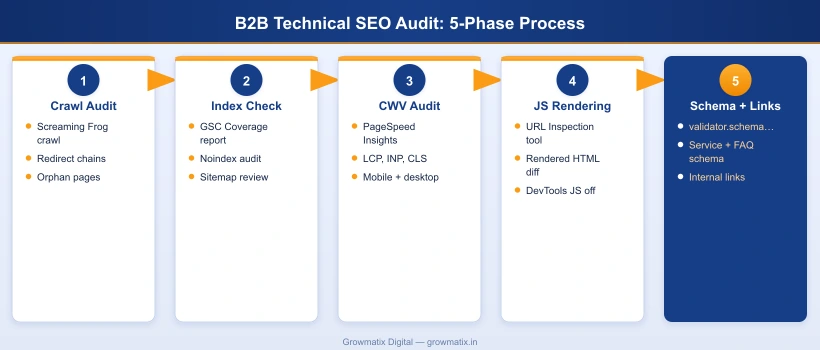
Step 1: Full Crawl Audit with Screaming Frog
The crawl audit is the foundation. Everything else in the process depends on understanding which URLs your site serves and how search engines navigate between them.
Crawl configuration for B2B sites:
- Set Screaming Frog > Configuration > Spider > Max Threads to 5 for production sites to avoid triggering rate limiting
- Enable Configuration > Spider > JavaScript if your site uses client-side rendering (critical for SaaS and tech B2B)
- Connect your Google Search Console account via Configuration > API Access > Google Search Console to overlay GSC data on crawl results
- Set the crawl start URL to the homepage and allow it to run to completion before analyzing results
Key reports to run after the crawl:
| Report | What to Look For | B2B Priority |
|---|---|---|
| Response Codes | 4xx errors (broken pages), redirect chains longer than 2 hops, 302 redirects used where 301s are needed | High: broken service and case study pages directly impact lead generation |
| Duplicate Content | Exact or near-duplicate page titles, meta descriptions, H1s, and body content across multiple URLs | High: parameter pages and CMS-generated archives commonly dilute service page authority |
| Internal Links: Inlinks = 0 | Pages with zero internal links pointing to them (orphan pages) | Critical: orphaned case studies, white papers, and solution pages get zero PageRank |
| Canonicals | Self-referencing canonicals on all key pages; check for canonicals pointing to wrong URLs or missing entirely | Medium: canonical misconfiguration causes crawl budget waste and ranking confusion |
| Page Titles and H1s | Missing, duplicate, or overly long (over 60 chars) titles; multiple H1s or missing H1 on key pages | High: title tag issues directly affect click-through rate from SERP |
| Crawl Depth | Pages accessible only 5 or more clicks from the homepage. Export via Crawl Analysis > Crawl Depth | Critical for B2B: service pages deeper than 3 clicks from homepage receive proportionally less crawl budget |
Crawl-to-index ratio check: After your Screaming Frog crawl, compare the total crawled URL count against your Google Search Console total indexed URL count. If Screaming Frog finds 2,000 URLs but GSC shows 800 indexed, you have a significant crawl budget and indexation efficiency problem that needs investigation before any other fix.
robots.txt audit: Review your robots.txt to confirm no high-value pages or directories are accidentally blocked. Screaming Frog flags URLs disallowed by robots.txt with “Blocked by robots.txt” status. Pay particular attention to:
/wp-admin/and other system paths (should be blocked)/service/,/solution/,/case-study/directories (must NOT be blocked)- Staging subdomain references that may leak into production robots.txt
Step 2: Indexability Audit Using Google Search Console
The Screaming Frog crawl shows what your server serves. Google Search Console shows what Google actually does with those pages.
Coverage report workflow:
- Step 1: Open GSC > Index > Coverage and review each status category
- Step 2: “Crawled, currently not indexed” is the most important segment for B2B. These are pages Google found but decided not to index. Common causes: thin content, duplicate content, soft 404s, or content that Google determined adds no unique value
- Step 3: “Discovered, currently not indexed” means Google found these URLs but has not yet crawled them. If this list includes service or solution pages, you have a crawl budget problem that internal linking changes can fix
- Step 4: Use the URL Inspection tool on each key commercial page to verify: indexing is allowed, the canonical URL is correct, and no noindex tag is present
XML sitemap validation: In GSC > Sitemaps, check that your sitemap is submitted and shows no errors. Your sitemap should include only indexable, canonical URLs. Run the sitemap URL through Screaming Frog (Mode > List > Upload > from Sitemap) and cross-check against the URLs marked as noindex or redirect in your crawl. Any noindex or redirected URL appearing in your sitemap is a crawl budget problem.
Noindex audit: Export all noindex-tagged pages from Screaming Frog (filter by “Noindex” in the Directives column). Verify that every noindex is intentional. Common accidental noindex situations on B2B sites include: development staging environments pushed to production without noindex removal, plugin-applied noindex to paginated archives that were later made canonical, and CMS settings that apply noindex sitewide after a template migration.
According to Ahrefs’ technical SEO audit guide, accidentally noindexed pages are one of the most common causes of unexplained organic traffic drops that teams misattribute to algorithm updates.
Step 3: Core Web Vitals and Page Speed Audit
Core Web Vitals are a confirmed Google ranking signal. More importantly for B2B, they directly affect the user experience of decision-stage buyers on your key commercial pages. A slow, layout-shifting service page is a conversion problem as much as a ranking problem.
The three Core Web Vitals thresholds (as of 2024 update):
- Largest Contentful Paint (LCP): Good = under 2.5s. Poor = over 4.0s. For B2B: hero images and above-the-fold H1s are the most common LCP elements. Preload them with
<link rel="preload">. - Interaction to Next Paint (INP): Good = under 200ms. Poor = over 500ms. INP replaced FID as a Core Web Vital in March 2024, as documented by Google’s web.dev INP documentation. INP measures responsiveness to all user interactions, not just the first one. Heavy JavaScript event handlers, bloated form scripts, and chatbot widgets are the main INP culprits on B2B sites.
- Cumulative Layout Shift (CLS): Good = under 0.1. Poor = over 0.25. Set explicit width and height on all images, avoid injecting above-the-fold content after page load, and define ad slot dimensions in CSS before ads load.
CWV audit workflow:
- Step 1: Open GSC > Experience > Core Web Vitals. Review URL groups marked “Poor” for both mobile and desktop. Prioritize mobile, as Google uses mobile-first indexing.
- Step 2: Run individual page audits with Google PageSpeed Insights (pagespeed.web.dev). Paste each key service page URL and review the “Field Data” section (real user data) separately from “Lab Data” (simulated).
- Step 3: In Chrome DevTools > Performance tab, record a page load and identify the LCP element visually. Check whether it is an image (needs preload or WebP format) or text (check server response time and render-blocking CSS).
- Step 4: For INP issues, use Chrome DevTools > Performance Insights > Interactions to identify which event handlers take over 200ms to respond.
B2B-specific CWV issues to watch for:
- Gated content forms with heavy validation scripts inflating INP
- Chatbot widgets (Intercom, Drift, HubSpot) adding 200-400ms to INP on first interaction
- Hero section background images loaded as CSS backgrounds (not preloadable by standard means)
- Elementor page builder adding layout shift when CSS loads after the page renders
Step 4: Site Architecture and URL Structure Review
B2B site architecture determines which pages receive crawl budget and internal PageRank. The hub-and-spoke model, where pillar service pages link to related blog posts and blog posts link back to the service page, is the most crawl-efficient structure for B2B.
Architecture audit checklist:
- Click depth: Every service page, solution page, and case study should be reachable within 3 clicks from the homepage. In Screaming Frog, filter Crawl Analysis > Crawl Depth and flag anything at level 4 or deeper that is a commercial page.
- Orphan page check: Filter Screaming Frog by Internal > Inlinks = 0. Every page with zero internal links is invisible to crawlers navigating from the homepage. Build internal links to these pages from contextually relevant content.
- URL slug audit: All URL slugs should be lowercase, hyphenated, keyword-rich, and evergreen (no year in the slug). URLs like
/services/b2b-seo-2024/create URL change requirements each year that disrupt backlinks and redirect chains. - Hub-to-spoke linking: Each service or solution page should link out to 2-4 related blog posts that address buyer questions about that service. Each blog post should include one natural inline link back to the relevant service page.
- Category and tag archive cleanup: WordPress and similar CMS platforms generate paginated archives for every tag and category. Either noindex these pages or ensure they serve unique enough content to justify indexing. Thin archive pages are a major source of crawl budget waste on B2B content sites.
URL parameter handling: If your site uses URL parameters for filtering, sorting, or session tracking (e.g., ?color=blue, ?page=2, ?utm_source=linkedin), configure parameter handling in Google Search Console under Settings > URL Parameters (legacy) or ensure canonical tags point all parameter variants to the clean canonical URL.
Step 5: JavaScript SEO and Rendering Audit
JavaScript rendering is the most frequently missed technical SEO issue on B2B SaaS and tech company sites. The problem is not that Googlebot cannot handle JavaScript. The problem is that Googlebot handles it in a second wave, often days after the initial crawl. Content loaded exclusively via client-side JavaScript may not be indexed at all, or may be indexed with significant delay.
For a detailed breakdown of the specific JavaScript SEO issues that affect B2B SaaS companies, including CSR vs. SSR rendering decisions and Googlebot rendering timelines, the dedicated guide covers each pattern with before-and-after examples.
JS SEO audit workflow:
- Step 1: In Google Search Console, run URL Inspection on a key service page. Click Test Live URL, then View Tested Page > More Info > HTML tab. Compare the rendered HTML to the page source (right-click > View Page Source in the browser). If the rendered HTML shows content that the page source does not, that content is JavaScript-dependent.
- Step 2: In Screaming Frog, enable Spider > JavaScript > Crawl JavaScript. Compare the crawl results with JavaScript enabled vs. disabled. Any URLs or navigation elements that disappear with JavaScript disabled are invisible to Googlebot in its first crawl wave.
- Step 3: In Chrome DevTools > Network tab, reload the page with Disable JavaScript checked (via Settings > Debugger > Disable JavaScript). Verify that: the navigation renders, the primary H1 and body content appears, and all CTA links are present. If significant content is missing, those elements need to be moved to server-rendered HTML.
- Step 4: Test with the Google Rich Results Test (search.google.com/test/rich-results) which renders pages using Googlebot’s rendering engine and shows exactly what structured data it detects.
B2B JS SEO issues to check specifically:
- Main navigation rendered via JavaScript (Googlebot may miss linked pages)
- Pricing tables, feature comparison matrices, and CTA buttons loaded via AJAX
- Customer logos, case study snippets, and social proof rendered client-side
- Chatbot scripts that inject content into the page after DOMContentLoaded
- Infinite scroll on resource or blog listing pages (Googlebot stops at the initial viewport)
Step 6: Schema Markup and Structured Data Audit
Schema markup is the fastest technical SEO fix with the most direct impact on SERP features and AI Overview inclusion. Most B2B sites have either no structured data or only the basic Organization and Article schemas added by a WordPress plugin.
Schema audit checklist by page type:
- Service pages: Must have Service schema (not Product), Organization schema with @id anchor, BreadcrumbList, and FAQPage if an FAQ section is visible on the page
- Blog posts: Article schema with author, datePublished, dateModified, and image; BreadcrumbList; FAQPage if FAQ section is present
- Homepage: WebSite, Organization, and SiteNavigationElement schemas
- About page: AboutPage, Organization, and Person schemas for named team members
Schema validation workflow:
- Step 1: Test each key page at validator.schema.org. Each schema type you have implemented should appear as a separate card. If a card is missing, that schema is either absent or has a parsing error.
- Step 2: Check GSC > Search Appearance > Enhancements. Each structured data type you have deployed (FAQ, Breadcrumbs, Article) appears as a separate section with “Valid”, “Warning”, or “Error” status.
- Step 3: For FAQPage schema specifically, verify that every Q&A in the schema block matches exactly what is visible in the FAQ section on the live page. Google rejects FAQPage rich results when the schema contains Q&As not present in the visible page content.
- Step 4: Check the Google Rich Results Test (search.google.com/test/rich-results) on your service and blog pages to confirm rich result eligibility for each schema type.
Common B2B schema gaps:
- Service pages with no Service schema (or Product schema incorrectly applied to intangible services)
- FAQPage schema present in plugin settings but FAQ content hidden behind a JavaScript toggle that Googlebot cannot see
- Multiple conflicting Organization schemas with different @id values across service pages and the homepage, which breaks entity graph consistency
- No BreadcrumbList schema on blog posts despite breadcrumbs being visible in the page UI
Step 7: Mobile Usability and HTTPS Security Audit
Google uses mobile-first indexing for all sites. If your B2B service pages have mobile usability issues, Google’s index uses the mobile version of those pages, not the desktop version, regardless of where most of your traffic comes from.
Mobile usability audit:
- Open GSC > Experience > Mobile Usability. Review all flagged issues: text too small to read, clickable elements too close together, content wider than screen, and viewport not configured.
- Test key pages in Chrome DevTools > Device Toolbar at 375px width (iPhone SE). Verify that: CTAs are thumb-sized (minimum 44x44px), form fields do not zoom on focus (set
font-size: 16pxon inputs), and horizontal scrolling does not occur. - Check that HTML tables are wrapped in
<div style="overflow-x:auto">for mobile scroll, rather than breaking layout on narrow screens.
HTTPS and security audit:
- Verify SSL certificate validity and expiration date. An expired certificate causes browser security warnings that destroy B2B trust signals instantly.
- Check for mixed content: HTTPS pages loading HTTP resources (images, scripts, stylesheets). In Chrome DevTools, mixed content warnings appear in the Console tab as “Mixed Content” errors.
- Confirm HSTS (HTTP Strict Transport Security) is configured in your server headers. HSTS tells browsers to always use HTTPS and eliminates the redirect from HTTP to HTTPS, improving page load speed slightly.
- Run your domain through Google’s Transparency Report (transparencyreport.google.com/safe-browsing/search) to verify it is not flagged for phishing or malware, which would trigger GSC Security Issues alerts.
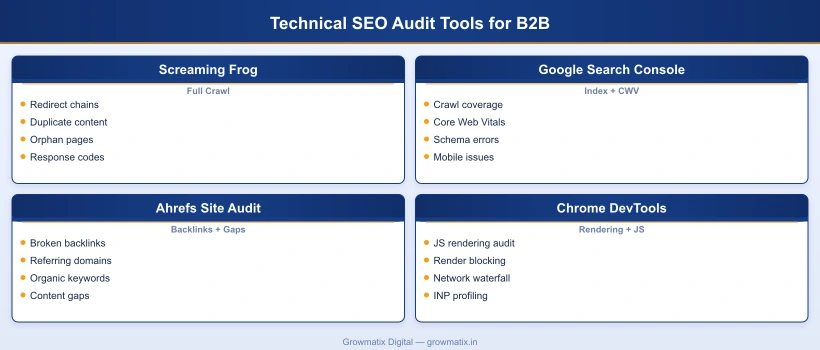
Technical SEO Audit Tools for B2B Teams
The right tool set for a B2B technical SEO audit depends on site size, team technical depth, and budget. Below is a comparison of the primary options, focusing on where each tool adds unique value rather than where they overlap.
| Tool | Primary Use Case | Cost | Best For |
|---|---|---|---|
| Screaming Frog SEO Spider | Full site crawl, redirect chain audit, duplicate content detection, orphan page identification | Free (500 URLs); £259/year for unlimited | Crawl depth, redirect issues, internal link analysis |
| Google Search Console | Indexability status, Core Web Vitals field data, schema enhancement errors, mobile usability flags | Free | Real Googlebot data; not available in any paid alternative |
| Ahrefs Site Audit | Backlink health, broken link detection, organic keyword gap analysis, automated crawl scheduling | From $129/month | Link audit combined with keyword and competitor data |
| Chrome DevTools | JavaScript rendering audit, performance profiling, network waterfall, INP debugging | Free (built-in) | JS SEO diagnosis; no other tool provides this depth |
| Google PageSpeed Insights | Per-page CWV scoring with both field data (real users) and lab data (simulated) | Free | Diagnosing LCP, INP, and CLS issues per URL |
| Semrush Site Audit | Automated audit across 140+ checks; integrates with Semrush keyword and backlink data | From $139.95/month | Teams that want a single platform for crawl, keyword, and link data |
Recommended stack for B2B teams under 500 pages: Screaming Frog (free tier or paid) + Google Search Console + Chrome DevTools. This covers all seven audit steps with zero marginal tool cost. Add Ahrefs if your link profile requires detailed backlink monitoring.
For enterprise B2B (500+ pages): Add Semrush Site Audit for automated monthly crawls between quarterly full audits, and Screaming Frog with custom extraction rules to audit schema at scale across all pages simultaneously.
How Often Should B2B Companies Run a Technical SEO Audit?
The answer depends on how frequently your site changes, not a fixed calendar schedule. That said, practical frameworks for B2B teams:
- Full audit: Quarterly. A complete 7-step audit covering all phases above. Dedicate 8-16 hours per audit depending on site size.
- Automated crawl monitoring: Monthly. Screaming Frog or Semrush Site Audit scheduled monthly. Flag new 4xx pages, new duplicate content, and redirect chain introductions. These automated checks catch issues introduced by CMS updates, new content published without SEO review, or plugin changes.
- Triggered audits: Immediately after specific events. Run a targeted audit within 48 hours of: CMS or platform migration, template redesign, new subdomain or subdirectory launch, major content restructure or URL change campaign, or any algorithm update that causes unexplained GSC traffic changes.
A consistent audit cadence also improves the accuracy of each successive audit. When you run a quarterly full audit, you establish a baseline of known issues. The next quarter, you can immediately identify which issues are new vs. pre-existing and prioritize accordingly. According to Ahrefs’ B2B SEO statistics, 40% of B2B companies lack internal SEO expertise, making a documented audit cadence especially important: it creates institutional knowledge that survives team changes.
The final step in any B2B technical SEO audit is connecting findings to the service-level B2B SEO work that will translate fixes into organic pipeline. Audit without remediation is just documentation.