



Internal Linking Strategy for B2B Websites
Table of content
Most B2B websites accumulate internal links the same way they accumulate clutter: without intention. A blog post goes live with one or two links inserted wherever felt natural during drafting. A service page gets linked from the footer and from one blog post written months earlier. A solutions hub published two years ago has never received a single internal link from anything. The result is a site where Google cannot easily identify which pages matter, link equity pools at the top and drains away before reaching commercial pages, and pages that should rank sit buried at crawl depth 5 or 6.
An internal linking strategy for B2B fixes this systematically. It determines where link equity flows, how anchor text reinforces keyword signals, which pages need rescuing from orphaned status, and how content clusters connect to reinforce topical authority. This guide covers every layer of that strategy with specific, implementable guidance for B2B SEO and web teams.
What Is an Internal Linking Strategy for B2B Websites
An internal linking strategy is a documented, intentional plan for how pages on a website connect to one another. It defines which pages should receive the most link equity, which anchor text to use for each destination, how deep each important page sits in the crawl hierarchy, and how content clusters link to reinforce topical authority signals.
The distinction between having internal links and having an internal linking strategy is the difference between random connection and deliberate architecture. Random links accumulate from normal publishing activity. A strategy maps link equity from high-authority pages toward commercial priorities, keeps critical pages within 2 to 3 clicks of the homepage, and connects content clusters bidirectionally so that each piece reinforces the others.
How Internal Links Pass PageRank Through a B2B Site
Every page on your website that has earned external backlinks carries a PageRank score: an authority value derived from the quantity and quality of links pointing to it. Internal links are the pipeline through which that authority flows to other pages. When a high-authority blog post links to your core service page, it transfers a portion of its accumulated equity to that page, improving its ranking potential without requiring new external backlinks.
The mechanics matter for B2B sites specifically because external backlink acquisition is slower and more resource-intensive than internal link optimization. Ahrefs’ internal linking guide makes this explicit: pages receive a share of the PageRank of each page linking to them, divided by the number of outgoing links on that linking page. This means fewer links on a page equals more equity per link, and strategic placement on your most-linked pages equals higher equity transfer than placement on thin or unlinked pages.
The Three SEO Functions of Internal Links
- Crawlability: Googlebot discovers pages by following links. A page with no incoming internal links may not be found at all, regardless of whether it appears in your sitemap. Internal links guarantee discoverability for every page you publish.
- Link equity distribution: PageRank flows through internal links. Pages that receive more internal links from high-authority sources rank more easily for their target keywords than equivalent pages with fewer incoming internal links.
- Topical context signals: The anchor text of an internal link tells Google what the destination page is about. A link with the anchor “B2B SEO audit checklist” signals to Google that the destination page covers that specific topic, reinforcing keyword relevance beyond what the page itself can communicate.
B2B buyers also consume multiple pieces of content before engaging with sales. Forrester’s 2024 State of Business Buying report found that 75% of B2B buyers complete most of their research journey before speaking with a vendor. Internal links are the mechanism that keeps those buyers on your site as they move from awareness content to solution pages, rather than exiting to a competitor’s site to continue their research.
Link Equity Distribution: Directing PageRank to B2B Priority Pages
Link equity distribution is the most strategically important dimension of internal linking for B2B sites. Your homepage and top-performing blog posts accumulate the most external backlinks and therefore the highest PageRank scores. The question is whether that equity is flowing toward your most commercially valuable pages, or dispersing randomly through the site architecture.
Identifying Which B2B Pages Deserve the Most Link Equity
Start with commercial intent. On a B2B website, the pages that convert visitors into pipeline, specifically service pages, solution pages, and product category pages, should receive the most link equity. These pages typically earn fewer external backlinks than informational blog content, which means they depend on internal link equity to compete in search rankings.
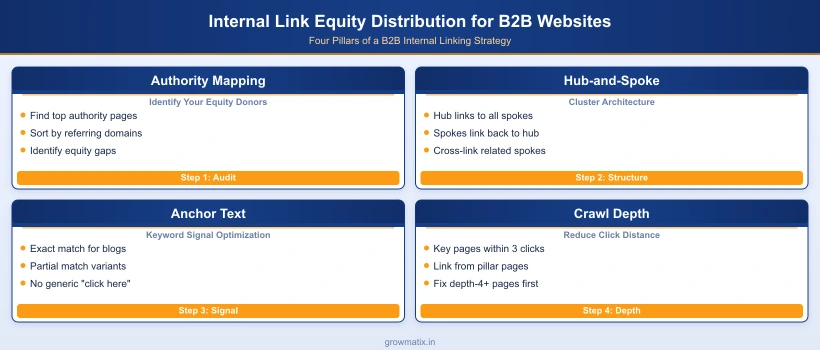
In practice: run an Ahrefs or Semrush crawl, sort by “Referring Domains” descending to identify your top authority pages. These are your equity donors. Then pull a separate list of your highest-priority commercial pages sorted by target keyword difficulty. The gap between these two lists is your internal linking opportunity: high-authority donors that are not currently linking to high-priority commercial destinations.
The Hub-and-Spoke Model for B2B Link Equity Flow
The hub-and-spoke model organizes your site into topic clusters, each with one high-authority hub page (pillar content or a core service page) connected bidirectionally to multiple spoke pages (cluster posts, case studies, feature guides). Link equity flows from the hub outward to spokes, and from spokes back to the hub, creating a reinforcing loop that amplifies the authority signal of every page in the cluster.
For B2B websites, this architecture maps naturally to your service and solution categories. A service page for “B2B SEO” becomes a hub, and blog posts covering specific SEO topics (technical audits, schema markup, internal linking) become spokes. Each spoke links back to the hub, concentrating equity on the commercial page. The hub links out to spokes, giving them topical context and discoverability. When you apply this model across multiple service categories, each cluster operates as a self-reinforcing authority engine.
The approach to B2B link building and authority works in parallel with internal linking: external backlinks bring equity into the site at the domain level, while internal links determine where that equity gets directed once it arrives. Neither strategy is complete without the other.
Diagnosing PageRank Dilution on Large B2B Sites
PageRank dilution occurs when high-authority pages scatter their outgoing links across too many destinations, or when equity-rich pages link heavily to low-priority pages like tag archives, pagination URLs, or author profile pages. Common dilution patterns on B2B sites include:
- Global navigation over-linking: A navigation bar that links to 30 or more pages distributes homepage equity thinly across all of them. Each link gets less than 1/30th of the available equity.
- Footer link lists: Sites with 20 to 50 footer links on every page dilute equity from every page into the footer’s link targets. Reduce footer links to navigation essentials only.
- nofollow on internal links: Some CMS themes and plugins add nofollow attributes to internal links automatically. This blocks equity transfer entirely. Audit using Screaming Frog under Reports > Directives to identify misconfigured internal links.
- Redirect chains between internal pages: Every redirect hop reduces the equity transferred. If Page A links to Page B, which 301s to Page C, equity loss occurs at the redirect. Update Page A’s link to point directly to Page C.
Anchor Text Strategy for B2B Internal Links
Anchor text is the visible, clickable text of a hyperlink. For internal links, it serves as a direct topical signal to both users and search engines about what the destination page covers. Google Search Central’s link best practices documentation describes good anchor text as “descriptive, reasonably concise, and relevant to the page that it’s on and to the page it links to.” Generic anchors like “click here” or “learn more” provide no signal.
Keyword-Rich vs. Branded Anchor Text in B2B Content
For internal links pointing to blog content and cluster pages, keyword-rich anchor text is the strongest signal. Unlike external link building, where exact-match anchor overuse risks algorithmic penalties, internal exact-match anchors are acceptable and beneficial. Linking to a technical SEO audit post with the anchor “B2B technical SEO audit” directly reinforces that page’s ranking signal for that keyword.
For internal links pointing to service pages and solution pages, a mix of keyword-rich and branded anchors is appropriate. A link reading “B2B SEO services” is keyword-rich; a link reading “Growmatix SEO team” is branded. Both signal something different. Use keyword-rich anchors when the link is placed in informational content where the reader is in research mode; use branded anchors closer to the conversion stage where the reader is evaluating vendors.
Anchor Text Variation to Avoid Semantic Repetition
When multiple blog posts all link to the same destination, using identical anchor text every time is a missed opportunity. Google’s understanding of a page’s topical relevance is informed by the aggregate of all anchor text pointing to it, not just one instance. Use semantic variation across posts:
- Exact match: “internal linking strategy B2B”
- Partial match: “B2B internal linking best practices”
- Topic variant: “link equity distribution for B2B websites”
- Question format: “how to structure internal links for B2B SEO”
Each variation reinforces a slightly different semantic angle on the same destination page’s topic. The aggregate builds a richer topical profile than 10 identical anchors pointing to the same URL.
Using Partial-Match Anchors to Reinforce Topical Relevance
Partial-match anchors include the primary keyword plus modifiers or context words. For a page targeting “anchor text strategy B2B,” a partial-match anchor might read “developing an anchor text strategy for B2B content” or “B2B anchor text guidelines.” These anchors read naturally in body copy, pass keyword context to the destination, and avoid the robotic quality of pure exact-match repetition.
One anchor text rule with no exceptions: never use the same anchor text for two different destination pages. If “B2B SEO strategy” always links to your service page in some posts and to a specific blog post in others, Google receives conflicting signals about which page should rank for that anchor. Assign each destination page a primary anchor text pattern and use variants of that pattern consistently across all posts.
Crawl Depth: How Site Structure Affects B2B Rankings
Crawl depth is the minimum number of clicks required to reach a page starting from your homepage. It directly affects how often Googlebot visits a page and how much crawl priority Google assigns to it. Pages at depth 1 (linked directly from the homepage) receive the highest crawl frequency. Pages at depth 4 or deeper receive significantly lower crawl priority, which translates to slower indexation and reduced ranking potential regardless of content quality.
What Crawl Depth Means for B2B Service Pages
On most B2B websites, the pages with the highest commercial intent sit at the greatest crawl depth. A homepage links to a “Services” page at depth 1. The “Services” page links to individual service category pages at depth 2. A specific solution sub-page lives at depth 3. A variation of that solution targeting a specific vertical might be at depth 4 or 5. By the time Googlebot reaches it, that page is receiving minimal crawl attention despite being exactly the page you want ranking for high-intent queries.
The fix does not require restructuring your site navigation. Adding internal links from shallower, high-authority pages to deep commercial pages directly reduces their effective crawl depth. A blog post at depth 2 that links to a solution page at depth 5 effectively makes that solution page reachable in 3 clicks from the homepage through that blog post path.
Auditing Crawl Depth in Screaming Frog and Sitebulb
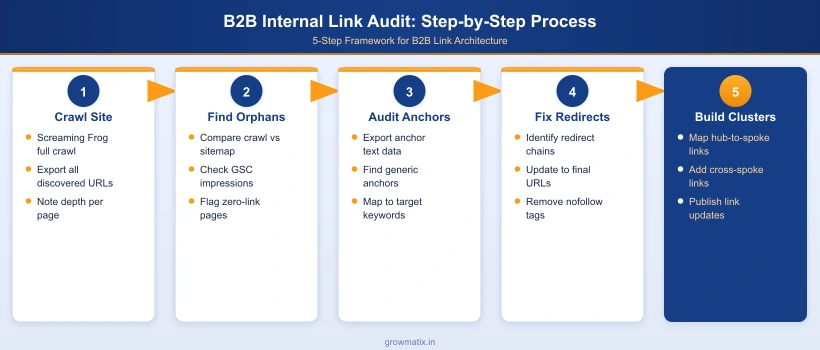
Screaming Frog surfaces crawl depth in its built-in crawl depth report. To access it: run a full crawl of your domain, then navigate to Reports > Crawl Depth. This generates a breakdown of how many pages sit at each depth level. Any depth-4 or deeper pages that are commercially important should be flagged for internal link reinforcement.
Sitebulb provides a visual crawl tree under Hints > Internal Linking that maps your actual link graph, making it easier to spot architectural gaps. For either tool: filter depth-4-plus pages by page type, identify service pages, solution pages, and pillar content sitting at excessive depth, then systematically add internal links from shallower pages in the same topic cluster to bring them up the hierarchy.
Reducing Click Depth for B2B Priority Pages
Practical depth-reduction tactics for B2B sites:
- Homepage link audit: Review which pages are linked directly from your homepage. If a core service category is not in the main navigation and not linked from the homepage body, its entire sub-tree starts at depth 2 at best. Add homepage links to your highest-priority service hubs.
- Pillar page promotion: Pillar pages in your content clusters should link to the most important solution pages in your cluster’s commercial orbit. A pillar page on “B2B SEO” at depth 2 linking to a specific “B2B technical SEO services” page at depth 5 reduces that page’s effective depth to 3.
- Blog hub pages: A blog hub or insights index page that links to both pillar posts and directly to service pages keeps the entire content architecture shallower. Most B2B blog archives link only to posts, not to service pages, missing a significant depth-reduction opportunity.
- Breadcrumb schema: While breadcrumbs do not directly reduce crawl depth, they create additional link paths from every page back up to parent category pages, providing Googlebot with multiple routes through your site structure. This is particularly valuable for B2B website architecture for SEO where the link hierarchy is complex.
Finding and Fixing Orphaned Pages on B2B Websites
An orphaned page is a page with zero incoming internal links from anywhere else on the site. It may exist in your sitemap, receive external backlinks, or show up in Google Search Console, but because no internal page links to it, Googlebot has no navigational path to discover it through regular site crawling. The page receives no internal link equity and its ranking potential is severely limited regardless of how well-optimized the page itself is.
What Creates Orphaned Pages in B2B Content Programs
Orphaned pages accumulate through four primary patterns on B2B sites:
- Blog posts published without internal links: A post published with no links pointing to it from existing content starts as an orphan. If no subsequent posts link to it, it remains one indefinitely.
- Landing pages created for campaigns: Paid search or event landing pages often have no internal links by design (to reduce exit options), but when campaigns end, these pages become invisible to organic search.
- Pages removed from navigation: When site navigation is redesigned and old service pages are dropped from menus without being redirected or internally linked from other pages, they instantly become orphans.
- Migrated content without link updates: Site migrations frequently break internal link paths. A page that was well-linked before migration may have all its incoming internal links pointing to old URLs that now 301 redirect, effectively making it an orphan from a link equity standpoint.
How to Identify Orphaned Pages with Crawl Tools
The standard orphan-finding workflow combines three data sources:
- Site crawl output: Use Screaming Frog or Ahrefs Site Audit to crawl your domain and export all discovered URLs. These are the pages reachable through internal links.
- XML sitemap export: Export all URLs from your sitemap. Any URL in the sitemap that does not appear in your crawl output is a candidate orphan (the crawler could not reach it via links).
- Google Analytics pageviews: Export URLs that have received organic traffic in the past 6 months. Any URL appearing in Analytics but not in the crawl output has been visited despite being unreachable through internal navigation, typically via direct URL access, external links, or GSC discovery.
Semrush’s orphaned pages guide notes that Semrush Site Audit runs this comparison automatically, surfacing orphaned URLs in its Issues report without requiring a manual data merge. Ahrefs Site Audit similarly flags pages with zero internal links in its crawl report under the “Issues” tab.
Prioritizing Which Orphaned Pages to Rescue First
Not all orphaned pages are worth rescuing. A campaign landing page with no backlinks and zero organic traffic is a low-priority rescue. A solution page with 8 external backlinks and no internal links pointing to it is a high-priority rescue: it is leaking the equity those backlinks bring into a page no one can navigate to.
Prioritization matrix: rank orphaned pages by (1) number of referring domains, (2) organic impressions in Google Search Console, and (3) commercial intent of the page content. Pages with external backlinks take top priority; those with impressions but no internal link equity are next; purely internal pages with no backlinks and no traffic can be consolidated into existing pages or removed with a 301 redirect.
Internal Linking for B2B Topic Clusters and Content Hubs
Topic cluster architecture requires deliberate internal linking to function as an authority signal. The hub-and-spoke structure that creates topical authority only works if the internal links between hub and spoke pages are in place. Without those links, the cluster is just a collection of individual posts that happen to cover related topics. With them, it becomes a coherent authority signal that Google can read as evidence of comprehensive topical expertise.
Bidirectional Linking Between Hub and Spoke Pages
Every spoke page in a cluster must link back to the hub page. Every hub page must link out to each spoke page. This bidirectionality is not optional; it is the mechanism through which the cluster signals topical authority. A hub page that links to only 4 of its 10 spoke pages tells Google that 6 of those spoke pages do not belong to this topical cluster, undermining the authority signal for the pages not linked.
The hub-to-spoke link should appear in the body content of the spoke page, not in a sidebar widget or footer section. Specifically, it should be placed in the introduction or in the first substantive section where the broader topic is referenced, because links positioned higher in the content carry more topical context weight. The spoke-to-hub link in the hub page should be placed in the section where the spoke’s specific subtopic is summarized, with a signal to the reader that the spoke page goes deeper on that angle.
Cross-Linking Between Spoke Pages in the Same Cluster
Spoke pages that share topical adjacency should also link to each other, not just to the hub. A B2B SEO cluster with spoke pages on technical SEO, internal linking, and crawl depth should have the internal linking spoke link to the crawl depth spoke (because crawl depth is a direct consequence of internal link architecture), and the crawl depth spoke link to the technical SEO spoke (because crawl budget and crawl depth belong in the same technical audit workflow).
These cross-links further strengthen the topical neighborhood signal for the entire cluster. They also keep buyers navigating within your content ecosystem as they move from one specific question to the next related question, extending session depth and reinforcing the topical authority signal Google measures through behavioral signals.
Anchor Text Consistency Within a Topic Cluster
Within a topic cluster, anchor text for hub-to-spoke and spoke-to-hub links should be consistent but not identical across posts. Assign each page in the cluster a primary anchor pattern, then use semantic variants across all posts that link to it. The hub page for “B2B SEO” might be linked with anchors like “B2B SEO strategy,” “SEO for B2B companies,” and “B2B organic search” across different spoke posts. Each variation adds a semantic data point that Google aggregates into a richer understanding of the hub page’s topical scope.
How Many Internal Links Per Page Is Good for B2B SEO
The question of how many internal links per page to use is one of the most searched internal linking questions, and the honest answer is that the number matters less than placement quality and destination relevance. Google has confirmed there is no hard upper limit on internal links per page, and that the right number depends entirely on the page’s purpose and content length.
Google’s Guidance on Internal Link Count
John Mueller of Google addressed this directly: there is no optimal number of internal links per page. However, he has also noted that adding links to every page from every other page destroys site structure and makes it harder for Google to understand topical context. The practical principle: each internal link should serve a clear purpose for the reader, either helping them navigate to relevant content or signaling to Google which pages are related by topic.
Google’s technical crawling guidance notes that Googlebot can crawl pages with hundreds of links, but that excessively high link counts dilute the crawl signal for each individual link. For most B2B content pages, the practical ceiling is determined by content length and genuine relevance opportunities rather than an arbitrary number.
Practical Internal Link Benchmarks by B2B Page Type
| Page Type | Recommended Internal Links | Priority Destinations |
|---|---|---|
| Homepage | 8 to 15 (via navigation + body) | Core service pages, pillar content, contact page |
| Service / Solution page | 5 to 10 | Related services, case studies, relevant blog clusters |
| Pillar / hub blog post | 8 to 15 | All cluster spoke pages, one service page |
| Cluster / spoke blog post | 4 to 8 | Hub page, 1 to 2 related spoke pages, one service page |
| Case study / results page | 3 to 6 | Related service page, relevant cluster posts |
| Landing page (conversion-focused) | 0 to 3 | Minimal links to reduce exit paths; focus on conversion |
Why Contextual Placement Outperforms Raw Link Count
A page with 3 internal links placed contextually within relevant body copy sends a stronger signal than a page with 15 links dumped into a “Related Posts” block at the bottom. Google’s crawlers weight links positioned higher in the content more heavily than footer links. Links that appear within a sentence related to the destination page’s topic carry more topical context than generic recommendation modules.
Semrush’s internal linking research identifies links placed in the body content as consistently more valuable than sidebar or related post links, because the surrounding paragraph context reinforces the anchor text’s topical signal. For B2B content teams, this means the most impactful internal linking work happens during the drafting phase, not as a post-publish checklist item. Plan which pages to link to before writing begins, identify the sentence in each section where the link fits most naturally, and draft the anchor text as part of the sentence rather than retrofitting it after.
SearchPilot’s controlled tests across large editorial sites found that adding contextual internal links to relevant pages produced measurable traffic uplifts on destination pages, with one test showing a 7% uplift in organic traffic to receiving pages within a single test cycle. The effect is consistent and cumulative: each additional well-placed internal link adds to the destination page’s ranking signal without requiring new external backlinks or content changes on the destination page itself.
For B2B teams looking to get structured SEO support to build this architecture across a full site, our B2B SEO services include a full internal link audit and implementation as part of the technical optimization phase.